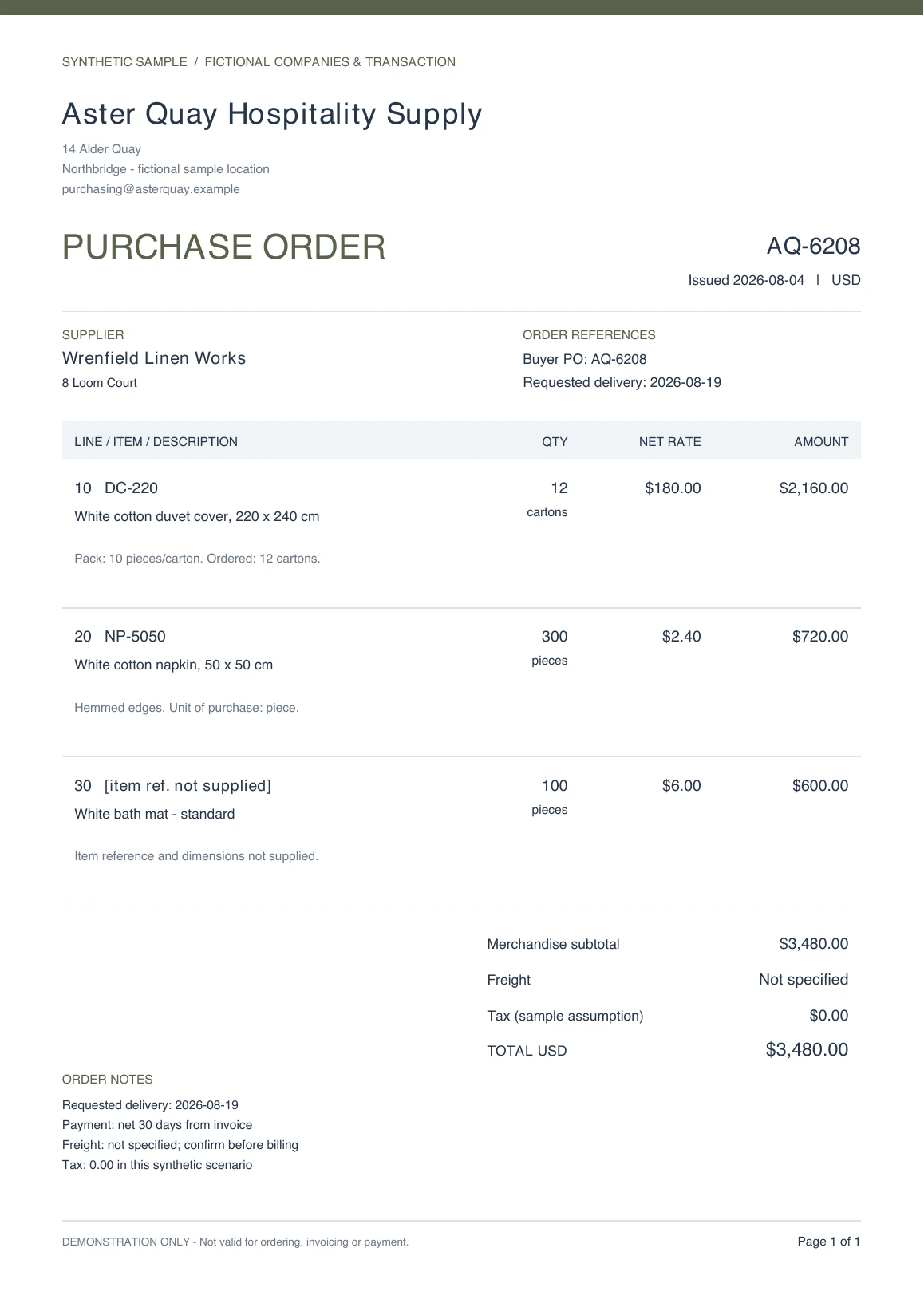
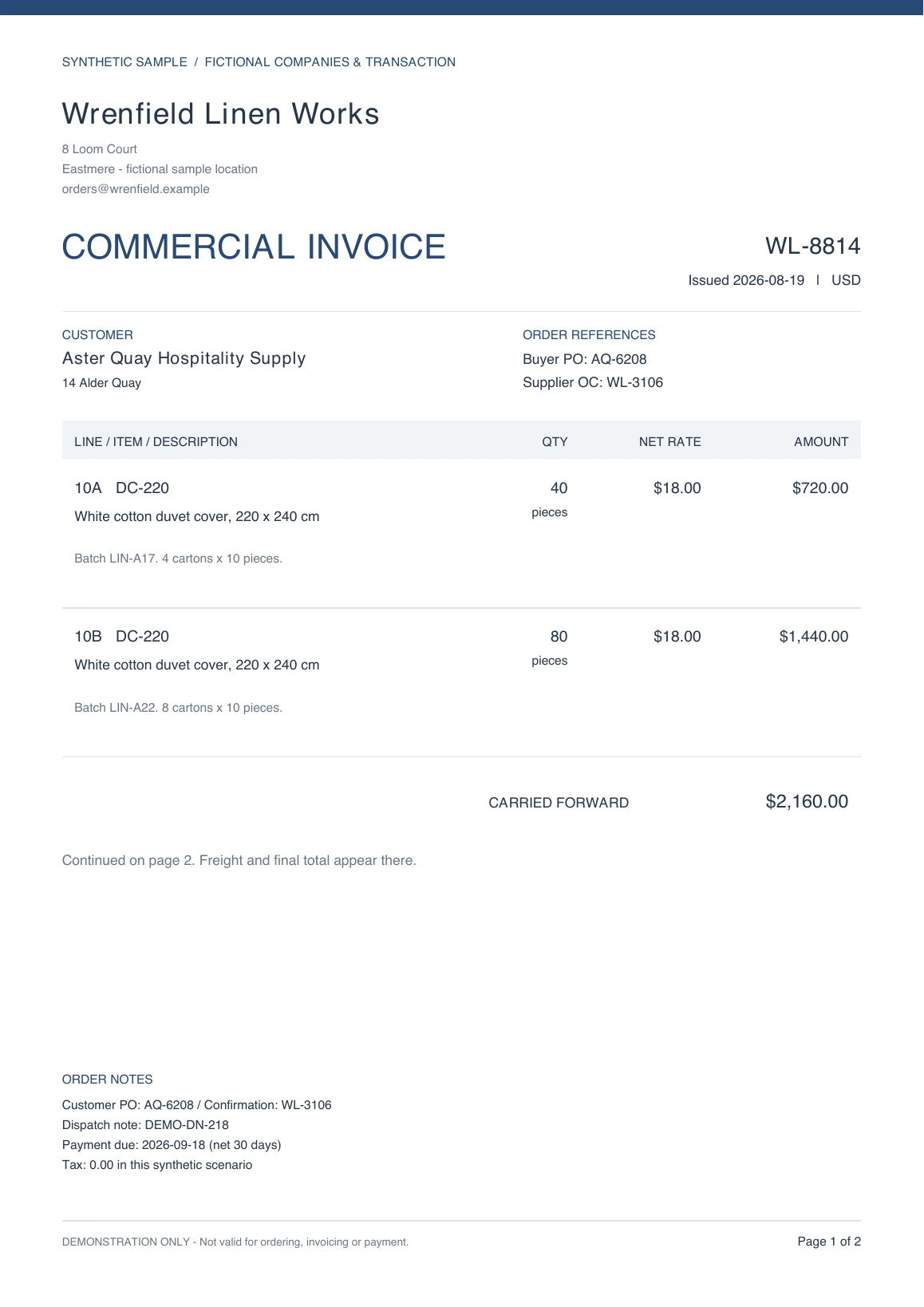
Find differences across orders, confirmations and invoices.

LineRecon is being built to compare the fields that matter and trace differences back to their sources. Review quantities, prices and references, with the final decision in your team’s hands.

In development. Try the synthetic demo below.

See the difference. Check the source.

Select a finding to see its original source on both documents.

Interactive sample.Synthetic documents, prepared findings

Hospitality linen orderAQ-6208 3 documents

Check confirmed items and prices against the supplier’s invoice.

2 differences1 consistent

Findings 3

A finding is not an approval. The decision stays with you.

Difference

A $0.20 change across 300 pieces

Not reviewed
Order confirmation$2.40 / piece · $720.00
Commercial invoice$2.60 / piece · $780.00
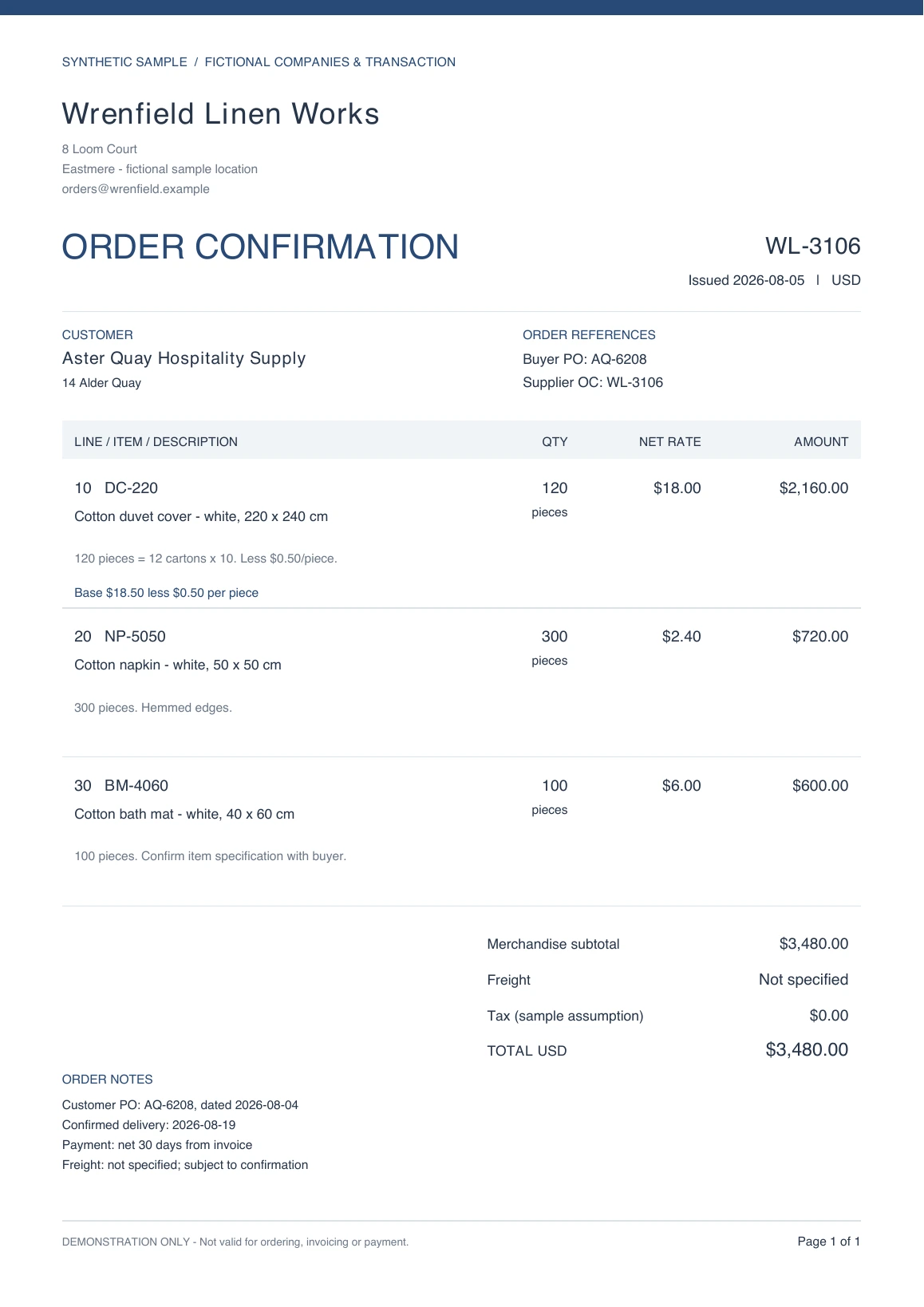
Order confirmationWL-3106
Open PDF ↗
Wrenfield Linen Works
Synthetic Order confirmation WL-3106, page 1. Selected source rows are highlighted; a text version follows.
Read selected source text

WL-3106 · Line 20 · Page 1

NP-5050 - Cotton napkin - white, 50 x 50 cm

300 pieces. Hemmed edges.

Original quantity
300 pieces
Base unit price
$2.40 / piece
Discount per unit
$0.00
Line amount
$720.00
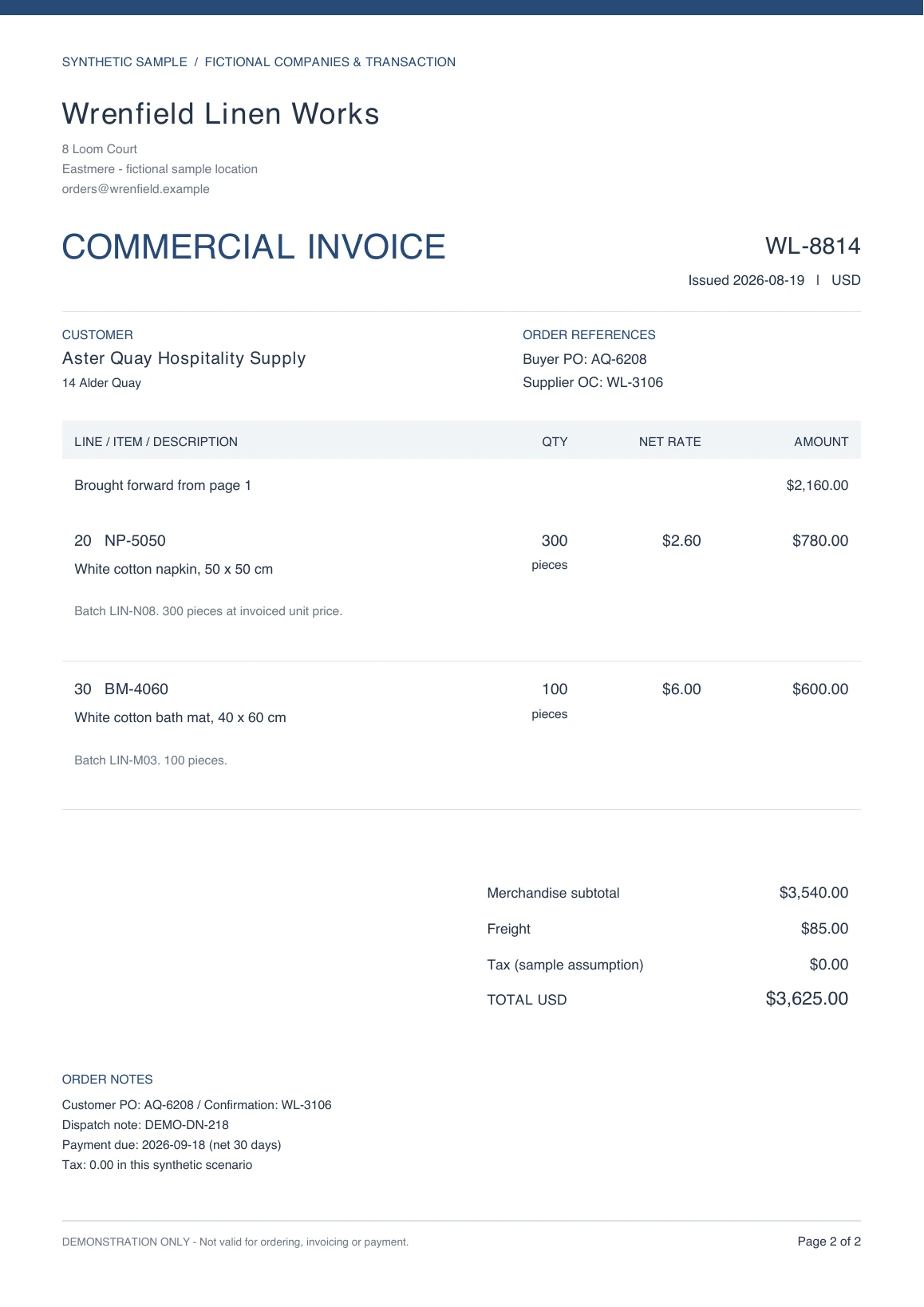
Commercial invoiceWL-8814
Open PDF ↗
Wrenfield Linen Works
Synthetic Commercial invoice WL-8814, page 2. Selected source rows are highlighted; a text version follows.
Read selected source text

WL-8814 · Line 20 · Page 2

NP-5050 - White cotton napkin, 50 x 50 cm

Batch LIN-N08. 300 pieces at invoiced unit price.

Original quantity
300 pieces
Base unit price
$2.60 / piece
Discount per unit
$0.00
Line amount
$780.00
Understand this finding
($2.60 − $2.40) × 300 = $60.00

The napkin item and quantity match, but the invoiced unit price is higher. Each document’s line arithmetic is internally consistent; the difference is between the documents.

What needs your attention: Check for an approved price amendment. The sample contains none, so the difference remains open.

Inspect the full sample documents
Purchase orderOrder confirmationCommercial invoice

Fictional companies and precomputed findings. No files are uploaded or processed here. Hotel linens are one example, not an industry restriction.

Which documents do you need to compare?

Practical guides and a worked example for reviewing business documents, one source at a time.

What fields should you compare?

Quantities, prices, delivery dates, references. Your team decides which fields matter before a batch is processed.

Upload the batch, then review the proposed comparison plan. Adjust the fields, resolve unclear details, or explicitly reuse a saved setup before confirming the plan and starting the comparison.

Define the check once.

An illustrative set of fields for a supplier review.

FieldWhat to look for
Item referenceThe product code printed on each source
QuantityThe recorded amount and its original unit
Unit priceThe stated price, currency and pricing unit
Delivery dateThe date as written, with ambiguity flagged

Keep the setup for next time.
Reuse field definitions, never last batch’s business values. Review and confirm before applying.

Finding a difference
isn’t the same as
making a decision.

Some differences are errors. Others are agreed changes. LineRecon is being built to make the evidence clear, so your team can make that call.

  • Keep the originals in view.

    Review both sources together. A correction or accepted difference never overwrites the original evidence.

  • Leave uncertainty visible.

    Uncertain record relationships need your confirmation. Different units and currencies stay not comparable.

  • Keep a record of the decision.

    Accept a difference with a reason, or mark it for follow-up. New result versions retain the history.

How will LineRecon’s review workflow work?

Keep your existing business systems. The planned workflow starts with files and ends with a review you can trace.

  1. Upload the batch

    Bring the PDFs or photos you want to compare together. Keep the original files as evidence.

  2. Confirm the plan

    Review the proposed fields and unclear details. See estimated credits before starting paid analysis or comparison.

  3. Review the evidence

    Follow each finding to its sources. Confirm uncertain pairings and record your decisions.

  4. Take the review with you

    Planned Excel and PDF reports include unresolved items, so open questions stay visible.

Full document processing and report export are in development. This site demonstrates the review experience with prepared examples.

How will LineRecon pricing work?

Planned credit-based pricing, with one-off credit packs and optional subscriptions. See an estimate before processing; final credits reflect actual model usage.

Work pauses if credits run out.

Top up, then choose when to continue.

Packages and prices are still being finalized.
No payment is collected on this site.

Tell us about your volume

What else should you know about LineRecon?

What LineRecon is for, and where it is today.

Can I use LineRecon with my documents today?

Not yet. The complete processing and review workflow is in development. You can explore the synthetic sample and request early access. This website does not accept document uploads or payments.

What can I compare?

LineRecon is being built for procurement, operations and finance teams comparing business documents. PDF and photo inputs are planned. You choose the fields to compare; orders, confirmations and invoices are examples, not a fixed template. Interpreting contract clauses or judging compliance is outside the first version.

Are these real results?

The companies, products and transactions in this demo are fictional. Findings are prepared examples, not live AI output. The highlighted pages come from the downloadable sample PDFs, so you can inspect the original values yourself.

Will LineRecon decide which document is right?

LineRecon checks consistency without assuming one source is correct. Your team reviews uncertain relationships and decides whether to accept a difference or follow up. Different units or currencies are not automatically converted, and accepting a difference does not erase it.

Can I reuse my setup?

In the planned workflow, upload the batch first, then choose a saved setup while reviewing the comparison plan. Review, adjust and confirm its fields and settings for this batch. Reusing a setup does not copy old document values, learn permanent rules from a pairing or silently approve new differences.

Do I need to replace my current system?

No replacement is planned. Start with files from your existing workflow. Automatic order entry, ERP posting and external system integrations are outside the first version.

How will pricing work?

Planned pricing uses credits, with one-off packs and optional monthly or annual subscriptions. Page counts help estimate usage; final credits reflect actual model usage. Work pauses on insufficient balance and resumes when you choose Continue after topping up. Prices and packages are not finalized.

What is business document reconciliation?

Business document reconciliation compares related records across documents to identify consistent values, differences and information that still needs confirmation. A finding records what differs; a person decides what to do next.

Different documents describe different stages.

The OASIS Universal Business Language 2.3 standard defines separate Order, Order Response and Invoice document types. They provide useful context for comparing a request, a supplier response and a bill.

For international trade, the International Trade Administration’s commercial invoice guide describes an invoice as a document between seller and buyer that states the goods sold and the amount the customer pays.

These references explain document terminology. LineRecon’s worked example illustrates our review approach with fictional records; it is not a claim of UBL compatibility or customs compliance.

By the LineRecon team · Updated .

Make room for
the work after the check.

Tell us what your team reconciles. Help shape an early version around the details that cost you the most time.

  • Walk through the sample report
  • Tell us what you compare today
  • Hear when early access is available

Early access, built with your input.
No payment. No document uploads.

Let’s start with your workflow.

Share a little about your needs. We’ll use your email to follow up on this request.

Please describe your workflow, without confidential document contents.

For this request only. No automatic newsletter signup.
How we handle your information

You can also contact us by email.